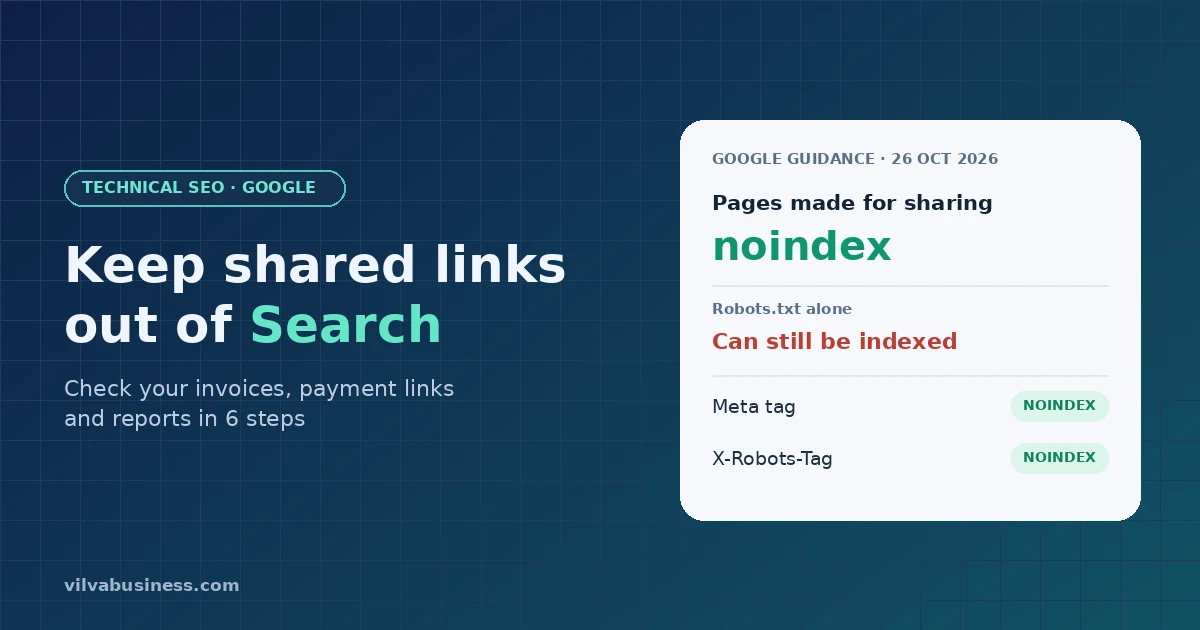
Short answer: On 26 October 2026, Google added a section called "Only index content meant for Search" to its help page on preventing user-generated spam. It says pages created "for direct sharing, collaboration, or utility" should be kept out of search by default. If your business software creates invoices, payment links or reports that customers open by link, check whether Google can index them. The safer fix is a noindex rule, sent as a robots meta tag or an X-Robots-Tag header, rather than a robots.txt block on its own. This is guidance, not a new penalty, but it is worth an afternoon of checking.
What did Google change?
Google updated its Search Central page "Prevent user-generated spam on your site and platform" (last updated 26 October 2026). As Search Engine Land also reported, the introduction now covers "tools that let users publish shared pages, generated content, or web apps", and a new section reads:
"When pages are created for direct sharing, collaboration, or utility rather than public search discovery, apply the noindex rule (using a robots meta tag or X-Robots-Tag HTTP response header) or block crawling in robots.txt by default."
Google's own changelog gives the reason: "To help platforms keep user-created pages that aren't meant for Search out of the index and detect spam earlier", as reported by PPC Land.
The page also added two monitoring tips. Verify your site or subdomain in Search Console so Google can email you about manual actions or security issues, and check the Page Indexing and Search performance reports regularly for "unexpected spikes in indexed pages, impressions, or queries" that don't match what your platform is for.
Is this a new penalty?
No. It is an update to a help guide, not to Google's spam policies. Google has given no enforcement date and described no consequence for sites that leave shared pages indexable. Some SEO consultants have speculated that action could follow, but that is speculation. Treat this as good housekeeping that Google is now putting in writing.
Why should an Indian SME care?
Google's wording is aimed at platforms: AI chat tools, app builders, hosting services. But plenty of ordinary business software does the same thing on a smaller scale. Every time your billing or CRM tool creates a page and sends a customer the link, that is a page "created for direct sharing". Common examples:
- Invoices and quotations opened from an email or WhatsApp link
- Payment links sent to collect dues
- Reports: marketing, SEO, analytics or account statements shared with clients
- Order-tracking and order-confirmation pages
- Shared dashboards, forms and AI-generated outputs
These pages were never meant for strangers. If one is indexed, three things can go wrong:
- Privacy: a customer's name, amount due or business details could show up in a Google search. Shared ChatGPT conversations appearing in search results in 2025, sometimes with personal details, is the best-known example of how this happens.
- Index clutter: hundreds of thin, near-identical pages on your domain add nothing for searchers. See why your website isn't ranking: the technical SEO mistakes Indian SMEs make.
- Abuse: Google's concern is that spammers use tools that publish pages on a trusted domain to fill results with junk.
Can Google find a link I only sent on WhatsApp?
It can. A share link rarely stays where you sent it. Customers forward it, paste it into emails or group chats, and sometimes post it publicly. Once a URL appears anywhere Google crawls, Google can discover it. "We never submitted it to Google" doesn't mean "Google can't find it". The only reliable control is a clear instruction on the page itself.
Noindex or robots.txt: which one?
Google's new section offers both options, but they work differently and don't combine well.
- noindex tells Google: you may read this page, but don't show it in results. You can add it as
in the page, or as anX-Robots-Tag: noindexHTTP header. The header also works for PDFs, which matters if your invoices are PDF downloads. - robots.txt Disallow tells Google: don't fetch this URL. It does not keep the URL out of the index. Google's own robots.txt introduction says a disallowed page "can still be indexed if linked to from other sites", typically showing the bare URL with no description, as Search Engine Journal notes.
The trap is doing both. If robots.txt blocks a page, Googlebot never loads it, so it never sees the noindex. Google's noindex documentation says exactly this: the rule only works if the crawler can read the page. Because share links are made to be pasted elsewhere, they are the pages most likely to be "indexed, though blocked by robots.txt".
Our recommendation: for invoices, payment links and reports, use noindex by default (an X-Robots-Tag header set once at server level is easiest), and keep those URLs crawlable so Google can see it.
How to check your invoices, payment links and reports
You don't need a developer for the first two steps.
Step 1: List every page type your tools create for sharing
Write down each tool that sends customers a link: billing, payment gateway, CRM, reporting, e-commerce, forms. Note the URL pattern each one uses, for example /invoice/, /pay/, /report/ or a separate subdomain. Remember that many tools host these pages on their domain, not yours; ask the vendor how they handle it.
Step 2: Run site: searches
In Google, search your own domain together with likely words:
site:yourdomain.com invoicesite:yourdomain.com payorsite:yourdomain.com inurl:paysite:yourdomain.com reportsite:yourdomain.com orderandsite:yourdomain.com quote
Repeat for any subdomain your tools use. A site: search is a rough sample, not a full list, so an empty result is reassuring but not proof.
Step 3: Add noindex
Ask your developer or vendor to send X-Robots-Tag: noindex on every shared page type, or add the robots meta tag to the page template. To check that it worked, open a share link in Chrome, open DevTools > Network, reload, and look for x-robots-tag in the response headers, or view the page source for name="robots".
Step 4: Don't also block those URLs in robots.txt
If robots.txt has a Disallow for /invoice/ or /pay/, Google can't read the noindex you just added. Remove that block for shared paths so the noindex can do its job. If you still want robots.txt in the mix, add it later, once the pages have dropped out of the index.
Step 5: Watch Search Console's Page Indexing report
Verify your domain, and any subdomain your tools use, in Google Search Console. Check the Page Indexing report every month. Look for sudden jumps in indexed pages and for the status "Indexed, though blocked by robots.txt", which usually means Step 4 needs attention. Also look at Search performance for queries that don't fit your business, such as customer names or invoice numbers.
Step 6: Use Removals for anything already indexed
If you find a private page in Google, add noindex first, then use the Removals tool in Search Console to hide it quickly. Removals is temporary (about six months); the noindex is what keeps it out for good. If the page shouldn't be public at all, expire or password-protect the link too.
What about pages customers want found?
Leave them alone. Your product pages, store listings, blog and service pages are meant for search. Google's guidance is about the default for pages made for a specific person or task. The line between "meant for search" and "meant for one customer" is yours to draw, so draw it on purpose and write it down.
From our experience
At Vilva, our own products create exactly these kinds of pages: invoices, payment links and reports that our clients send to their customers. These pages live on a separate domain from our main website, and our invoice, payment-link and report pages are set to noindex. As a practice we don't submit them to Google for indexing either, and we haven't noted any incidents of them showing up in search results.
The distinction matters. "Not submitted" is a weaker guarantee than "told Google not to index", which is why we rely on noindex rather than on nobody finding the link. If you use our fintech stack or VilvaCRM for invoices and collections, the checklist above still applies to every other tool in your stack.
The bigger lesson is one we keep coming back to. In the agentic AI era, software creates pages, links and outputs faster than any team can review them by hand. Securing and maintaining that software, deciding what is public and what is private and checking it regularly, is now a priority, not a one-time setup task.
Frequently asked questions
Should I use robots.txt or noindex for shared links?
Noindex, through a robots meta tag or an X-Robots-Tag header. A URL blocked in robots.txt can still be indexed if it's linked from elsewhere, and Google can't see a noindex on a page it isn't allowed to crawl.
Will Google penalise my site for indexed invoices or payment links?
Google hasn't said so. The 26 October change is guidance in a help document, with no enforcement date. The real risks today are privacy and a cluttered index.
Will adding noindex to shared pages hurt my rankings?
No. Noindex only affects the pages it's on. Invoices and payment links aren't pages you want ranking anyway.
Can Google index a page that's only shared on WhatsApp?
Yes, if the link gets posted or linked anywhere Google can crawl. Don't rely on a link staying private; add noindex.
How do I remove a private page that's already in Google?
Add noindex, make sure robots.txt doesn't block it, then request removal in Search Console's Removals tool. Removals is temporary; the noindex keeps it out.
Need a hand?
A technical SEO audit in GrowthOS can list the page types your site exposes to Google and flag anything that shouldn't be there. Book a demo and we'll walk through it with you.